
Day 2 of Google’s Search Central Live Deep Dive in Barcelona was all about indexing. Once Google has crawled a page, how does it decide what’s on it and whether it goes in the index?
The day covered text, then multimedia, then finished with a look at the index itself and Google Trends.
If you missed it, here’s my Day 1 recap on crawling.
Below are my notes from each session, in the order they ran.
How HTML is interpreted and controlling indexing
The day opened with Gary Illyes and Cherry Prommawin answering questions left over from Day 1.
First new session up was how HTML is interpreted. A simple overview to set up the rest of the day.
John Mueller then kicked off the main sessions with controlling indexing. He went through each of the robots meta tags, from the basics like noindex, none and all to lesser-known ones like max-snippet and max-video-preview.
His final recommendation was to use two directives if you want to be as visible as possible in Google:
<meta name="robots" content="max-image-preview:large, max-snippet:-1">The first allows large image previews. The second lets Google show as long a text snippet as it wants.
Rendering pages to index what users see
Erin Sparling from Google then moved on to JavaScript. More and more of the modern web is built with it, so Google has to render pages to see what users see.
The session gave a basic overview of Google’s rendering pipeline.

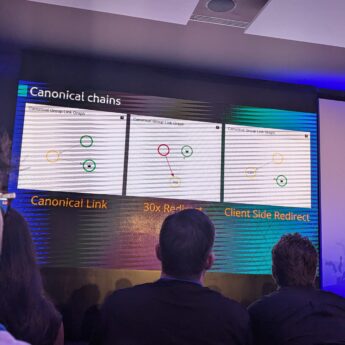
Tobias Schwartz example of canonical tag problems featured charts which make it easier to undertsand.
Lightning session D: rendering and JavaScript
Then it was over to the community speakers to show some real life example of where it can go wrong with JS.
Sören Bendig, CEO at Audisto: Uncover Common Website Rendering and JavaScript Execution Blind Spots
Sören showed examples from real sites of common problems with JavaScript. The kind that stop Google rendering a page the way users see it.
Rebecca Yu: debugging rendering
Rebecca had great tips on common rendering problems and how they show up. The top one was robots.txt blocking the resources the JavaScript needs to run.
E.g. if your JS files are disallowed, Google can’t build the page, even though it looks fine in a browser to the user.
Natalia Venditto , Adobe: reframing
Natalia finished the session with a new approach called reframing, which would allow AI-generated apps to be embedded into a website.
A very technical talk. There’s a push to make it a web standard, so one to watch.
What is Google-friendly JavaScript
Erin came back after the lightning talks to explain how it all fits together.
The stand-out detail was the viewport. Google loads pages with a viewport around 10,000 pixels tall, and it doesn’t scroll or click things on the page.
So any JavaScript that waits for the user to scroll or interact or click won’t run. E.g. content that only loads on a scroll event won’t be seen.
Erin then went into detail on the common problems the community speakers had raised, and how they look from Google’s side.
Understanding what’s on a page
Gary Illyes covered how Google works out what’s actually on a page.
Content in the main part of the page is given more importance. So anything in the navigation, footer and other boilerplate isn’t seen as important.
E.g. on a blog post, the title and body text matter. The categories list in the sidebar doesn’t. Its all about whats in the main section of the page.
He also explained how words are tokenised and given extra metadata, e.g. whether they sit in the main content. AI models work differently, turning words into number IDs instead.
He finished with soft 404s: pages that return a 200 OK but look like an error or empty page.
Handling web duplication
John Mueller came back to cover duplication.
Google first clusters similar pages together, picks one as the canonical, then assigns all the signals to that main page. The reasons he gave:
- Stop duplicate content appearing in results
- Leave more room to store unique content
- Keep the signals from every version
- Understand alternative versions of a page, e.g. hreflang, branding changes and migrations
That last point is why a site: search on an old domain can still show results after a migration.
He finished with his suggestions for handling duplicates:
- Use redirects for site migrations.
- Use HTTP result codes. Don’t block agents.
- Check your rel=canonical links.
- Use hreflang links to help Google localise.
- Report weird canonicals in the forums.
- Make secure pages that work.
- Keep canonical signals clear.
Lightning session E: duplicates and site moves
The lightning talks closed the morning.
Tobias Schwartz: canonical problems
Tobias showed examples of poor canonical setups, e.g. canonical loops and clusters with no clear canonical leader.
He used a visualisation to show the problem to people. A useful view when you need developers or stakeholders to see the issue.
Martyna Ağanoğlu, SEO Specialist at Loando / Clar: Domain & Portal Consolidation
Martyna talked through merging two brands. Two domains went into one, with a new site launched at the same time.
The site went from 2,000 pages to 100. There was no traffic drop, and revenue went up.
David Carrasco Pamies, SEO Consultant and Founder at Magnify: SEO for M&A Migrations
David’s point was that the hard part of a migration isn’t the migration. It’s the people.
Structured data: finding the gold nuggets
After lunch, Gary Illyes covered how Google finds the gold nuggets on a page. Images, structured data and video are pulled out and passed to a separate media indexing engine.
Ryan Levering, a software engineer at Google, then explained what structured data is and why the web needs it.
The interesting part was where it goes. Schema.org data is cleaned and filtered, then either shown in normal search results or used as context for AI Overviews and AI Mode.
The text in your schema is passed along with the content on the page. So it does feed Google’s AI features – not as code but added to context.
His view on whether to add it was simple. It’s never a negative to have structured data. The question is whether it’s worth the effort.
The new schema updates are focused on shopping, with more coming on Day 3. Server-side validation of structured data is also coming soon.
Images and video
Gary Illyes came back to go deeper on images and video.
Images. He walked through how Google extracts images from a page. A few practical points:
- Image sitemaps are worth looking at. They’re the best way to tell Google about images, especially ones loaded by JavaScript.
- Use the
<picture>element for responsive images. Google picks the most appropriate one, but it needs an<img>inside as a fallback. - Use WebP or AVIF, and keep file sizes not too big, just right.
Video. If you embed video, put it above the fold so it’s easy to see, especially on mobile. Add descriptive text around it, as that gives Google the context.
A video sitemap helps Google find embedded videos too, with the title, description, thumbnail and playback URL.
Lightning session F: media
Irene Cecotti, SEO/AEO Lead at PhantomBuster: Oops I did it again, how scaling alt text with AI lost my traffic
Irene was open about a mistake. She used AI to generate image alt text at scale, through Screaming Frog.
Performance dropped after the AI descriptions went live. A good reminder that faster isn’t the same as better, and that AI output at scale still needs checking.
Patrick Domanico, Technical SEO Manager & Freelance Journalist at dentsu: Prompt Journalism & Search
Patrick showed how he uses AI to edit interview transcripts ready for publication. E.g. cleaning up and formatting them, so interviews, podcasts and video become content that can be found in search.
Internationalisation and localisation
Cherry Prommawin picked up international SEO. She covered the common hreflang mistakes:
- Using more than one method to implement hreflang at the same time
- Not using the correct language codes
She also made the point that localisation is more than translating the content. Local details like date formats and currency need to change too.
Lightning session G: internationalisation
Alizée Baudez, International SEO Consultant: International SEO before the first hreflang tag
Her example was a furniture company. Sales in the Netherlands were lower than in France, even though the translation was good.
The reason was the homes. Dutch houses tend to be narrow and over several floors, while the French ones in her example were wider and over two. The products and imagery didn’t fit how Dutch customers live.
So think beyond the technical side. Hreflang gets the right page to the right market, but the page still has to make sense there.
Elham Borojerdi, SEO & GEO Strategist, and Zahra Laleh, SEO Strategist: The Challenges of Multilingual SEO for Non-Latin-Script Languages
Elham presented for both of them, looking at languages like Persian and Arabic.
Similar-looking characters in those scripts can change the results of keyword research. E.g. two spellings that look almost the same to a non-native speaker can be different searches.
She also said some tactics that might be seen as old-school SEO still work in those markets. Google updates tend to reach them later.
My poster session
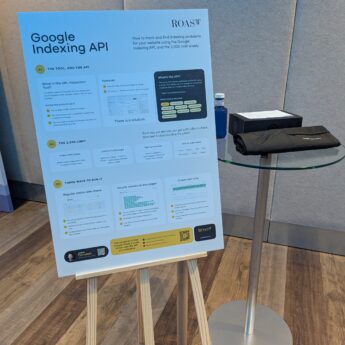
Mid-afternoon was the poster session, where I presented Google Inspection API Tool.
It’s a free Google Sheet that uses the Search Console Inspection API to check the indexing status of your URLs every day. It’s the URL Inspection Tool, but for hundreds or thousands of pages, on a schedule.
It works within Google’s limit of 2,000 inspections per site per day, and tracks changes over time. E.g. when a page drops out of the index, or Google picks a different canonical.
The conversations ran on, so I missed the next few sessions. That covered calculating signals, deciding what goes in the index, lightning session J and the indexing edition of “What would you do?”.
What the index looks like, and Google Trends
Gary Illyes then showed what the index actually looks like.
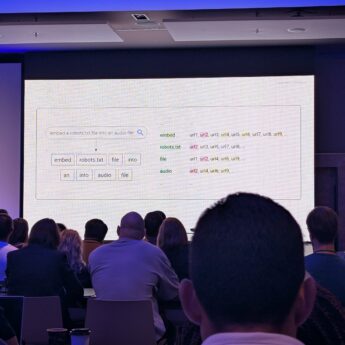
Results are retrieved through posting lists. Your query is split into separate words, each word points to a list of pages, and Google matches the pages that appear across the lists.
E.g. “embed a robots.txt file into an audio file” becomes embed, robots.txt, file and audio, each with its own list of URLs. Vector embeddings are used alongside this too.
Google Trends
Omri Weisman, Engineering Manager on Google Trends, started with a quiz of some very hard question based on what people have been searching for and thus appearing in Google Trends.
He then went through the tools within Google Trends, but explaining how the data need to be looking at in detail. Look at the anomalies in the data. A spike might come from another search that’s related to yours, not the term itself. Overall drops might not relate to a drop in search demand.
Trending Now data is fresh to within 10 minutes. That makes it useful for spotting reactive content gaps.
The new features in Google Trends:
- Gemini in Explore: suggests search terms and compares relevant trends, up to 8 terms at once
- Quick comparisons across time periods
- Maps: worldwide data down to sub-regions
- Category filter: back again in the new report.
A bonus tip: trends.google.com/tv gives you a live Trends screen for a TV. Worth putting up in the office.
There was no mention of the Trends API going public (later in the QA there was also no update).
What’s next
Day 3 is the final day, covering serving, ranking and AI features in Search. Ryan Levering also hinted at more shopping schema news, so that’s one to watch.
If you haven’t read it yet, catch up on my Day 1 recap on crawling.